Gérer les cookies utilisés pour la publicité, tels que la personnalisation des annonces, le remarketing et l’analyse des performances des annonces.
4.4.4. Configure SPF
We also recommend configure DKIM.
Important points:
- When using our MX record don't add the
+mxkey, as this will cause problems with mail delivery. To correctly send mail from our servers, the record should look likev=spf1 include:_spf.ukraine.com.ua ~all. - A domain should have only one SPF record. When sending mail from multiple mail services, their records should be merged into one.
- Do not specify too many domains in an SPF record, and note that records are checked recursively. If more than 10 DNS requests are required during the record validation process, mail will be rejected by mail servers.
SPF (Sender Policy Framework) is an extension for the SMTP email sending protocol. With SPF you can check if the sender's domain has been spoofed.
SPF allows a domain owner to specify, in a TXT record corresponding to the domain name, a list of servers that are authorized to send email with return addresses in that domain. Mail transfer agents receiving mail messages can query the SPF information with a simple DNS request, thus verifying the sender's server.
Without an SPF record in place, many email services may send all mail sent from domain mailboxes to spam, regardless of its contents.
Configure
Domain on our NS
If the domain mailboxes are hosted with us and the domain is served on our NS, then to configure SPF set our MX record. This will also automatically add the required SPF record in domain settings as well.
Attention!
An SPF record is automatically added only once when a domain is directed to our NS. If the record does not exist, add it manually.
What our SPF record looks like in domain settings: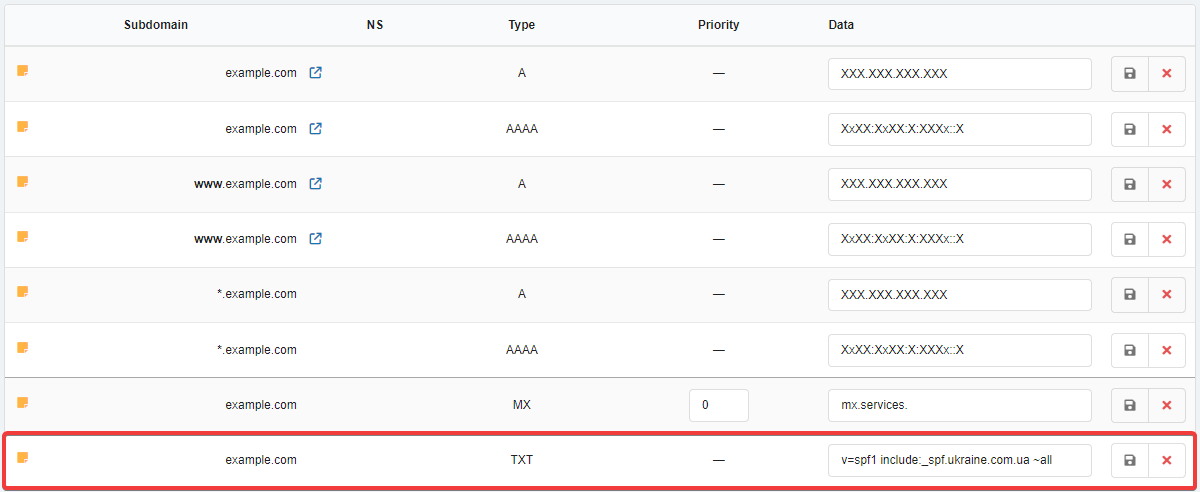
Domain on third-party NS
If the domain mailboxes are hosted with us, but the domain is served on NS of another provider, in the owner panel of these NS add such TXT record:
v=spf1 include:_spf.ukraine.com.ua ~allDescription of SPF
An SPF record consists of a set of keys used to form suitable and correct rules. After specifying the key, you must set the : symbol and specify the desired node.
Frequently used and important keys:
v=spf1— SPF version.- Behavior:
+— accept messages (Pass). Used by default if there are no other behavior keys.-— reject messages (Fail). Messages will not be accepted.~— "soft" rejection (SoftFail). Messages will be accepted but marked as spam.?— neutrally perceive the sender.
- Nodes:
mx— includes all server addresses specified in the domain's MX records. ⚠️ Do not use this key for domains with our MX record, as the addresses specified in it are not involved in sending emails and using the key may cause errors.ip4— specific IP addresses.ptr— check the PTR record for the presence of the specified domain.exists— domain operability check. It is important to keep in mind that this check will give a positive answer for addresses like127.0.0.1etc., which makes its use questionable.a— applying the rules to a specific domain by comparing the sender's IP address with the IP address from the domain's A records. ⚠️ Do not use this key if the site is hosted by us, as it may cause errors.include— using authorized nodes specified in the SPF records of another domain.redirect— means that the SPF policy for this domain is specified in another domain. This is somewhat analogous toincludewith ignoring records of the current domain.all— all addresses not listed in the record.
The rule for sending emails from our hosting usually looks like this:
v=spf1 include:_spf.ukraine.com.ua ~all
This rule specifies that emails sent from hosts specified in the _spf.ukraine.com.ua entry are allowed and will be delivered, while emails sent from other servers will be delivered but marked as spam.
To specify multiple servers, it is sufficient to list them. Examples:
- Using sending from our mail and from our own mail.example.com server:
v=spf1 include:_spf.ukraine.com.ua a:mail.example.com ~allIn this case, emails sent from our hosting servers, as well as from the server whose IP address is specified in the A record of the mail.example.com domain, will be delivered successfully.
- Using sending from our mail and from Google:
v=spf1 include:_spf.ukraine.com.ua include:_spf.google.com ~all - Need to allow sending from one domain but disallow sending from another:
v=spf1 +a:mail.example.com -a:mail.example.org ~allIn this case, sending from the servers pointed to by the mail.example.org A record will be prohibited and emails will be rejected.
To avoid composing the record manually, you can use online SPF generators.
SPF generators:
The availability and correctness of the finished record can be verified using online SPF checking tools.
(2)