Gérer les cookies utilisés pour la publicité, tels que la personnalisation des annonces, le remarketing et l’analyse des performances des annonces.
2.4.1.21. Site error logs (Error log)
Site error logs (Error log) — these are logs that contain information when a warning or error is triggered during the operation of the selected web server or PHP. They can be found in the "Site error logs" section.
Date and filters
Important points:
- Logs are stored only for the current and 3 previous months, and only for those days when there were requests to the sites. Older logs are not stored.
- The current date in the calendar is always available, regardless of whether there are entries on that day.
- If there is no log for yesterday in the calendar, it means that logs for that day are still being processed and will be available later (usually closer to the afternoon).
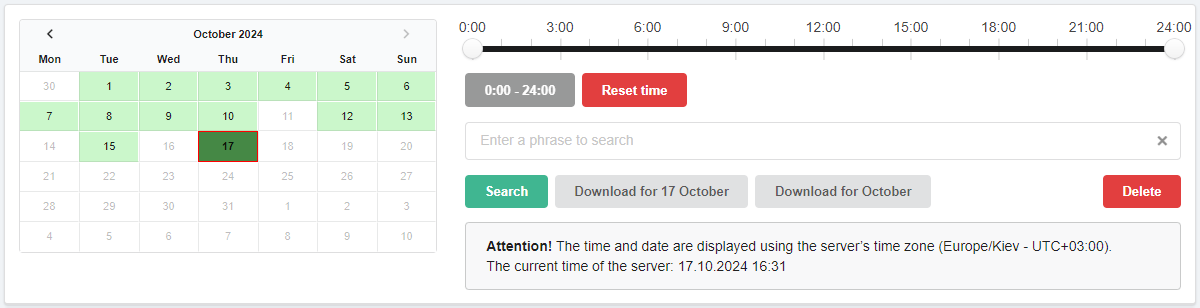
Calendar. Allows you to select the day for which the log will be displayed. In the calendar:
- Light green — days for which logs are available.
- Dark green — selected day.
- Red frame — current date.
Time filter. Allows you to view the log not for the whole day, but for a selected time period.
Search. Allows you to filter queries by the presence of certain text in them.
Download. Download buttons:
- "Download for day" — downloads the log for the day selected in the calendar.
- "Download for month" — downloads the log for the month to which the selected day in the calendar belongs. ⚠️ The log for the current month includes all days from the beginning of the month, except the current one.
Deleting. Button to delete log for a certain day or month. ⚠️ The log is deleted irretrievably, we recommend downloading it to yourself before deleting it.
Web server error logs
The IP address column is only available for the Apache web server.
Error logs of each web server — Apache, OpenLiteSpeed and PHP-FPM — are displayed in separate tabs. By default, the tab of the web server currently selected in site settings opens.

In most cases, you can be guided by the following simple principle: if the site or its individual pages start to show error 50x, you should first check its error log in our control panel:
- If the log has information about errors, it is worth comparing the time of errors on the site with the time of entries in the error log. It is very likely that the cause of the error will be described in the same lines, and the solution should be based on it.
- If the error log is empty, it is most likely that the 50x response code is generated directly by the scripts of the site itself. In this case, you should examine the logs of the site engine (or, for a start, how to enable them) or ask for help from the site developer or relevant specialists.
PHP error log
Important points:
- Errors are saved in the log only when logging is enabled by hosting means.
- When the log size becomes larger than 100 MB, logging is automatically disabled. Logging can be enabled either after the log is manually cleared or after the beginning of the next day, when a new log file is started. ⚠️ In all cases logging must be enabled manually, it is not enabled automatically.
- The time in the log is stored in the timezone set in PHP settings (parameter
date.timezone). Keep this in mind when viewing the log.

- "Time" — error date and time.
- "Error" — error text written to the log. Most often, the error text has a format that specifies the type and cause of the error, the file and the line where the error occurred. The format of errors can be quite different, depending on the classification and other factors, but most often it includes the following:
TYPE— error classification.ERROR— error text.PATH— path to the file where the error occurred.on line XX— line in the file on which the error occurred.
(3)